Showing posts with label GMAIL. Show all posts

Sunday, October 14, 2018

Be alert on your email account name

For well over 10 years I have been using gmail with Thomas.Traynor and ThomasTraynor without a problem.  If you check how they resolve names link here you can see how it is done.  I have received emails from others in the past who thought they were contacting another Thomas in Ireland, but, after I point out that I am in Canada they found the real email address of the other Thomas rather quickly.

For the last week my inbox has been flooded with on average a dozen emails a day from another Thomas Traynor who has set up accounts with various merchants for buying items online.  I have checked my credit card and there are no weird billings there.  I also checked online and it appears to be a legit mailing destination.  I have been contacting each online store explaining the issue and for them to stop sending emails to my email account.

Two of the emails from the online stores have received requests to change it to another account and part of the note stated that they 'lost' access to 'thomastraynor'.  Thing is that he never had access to that as I have always had that and used it.  Google is quite good when you create an account and won't let you use one that is in use so I am puzzled on how (or if) he got that email name.  I am very good about checking my email account names as I have five different alerts in Google set up to trigger on my name and various other names (online games) are mentioned and never has it shown up being used in the United Kingdom.

Update 2018-11-11

It has quieted down a lot for my email.  So far there is just one company that is still sending me emails for the person who tries to use my email address.  One of the emails had an 'unsubcribe' link which I used.  The other emails there is no such option.  I have had email conversations with them and they told me there is nothing they can do unless I provide the information used to create the account.  I pointed out I own the email address and didn't create that account so I cannot give them what they asked for.  They told me 'sorry nothing we can do' email back, well they will find out what is going to happen when I get the next one.  I have a bookmark for the OFCOM site in the UK and the Scottish privacy site.  I will be doing a mailing to them detailing the fact that the TSP (Telecom Service Provider) refuses to remove my email address and they are sending private and confidential information to a third party even after that fact was pointed out to them.

Update 2018-04-21

The last company finally stopped sending me the email.  I found the link to the ICO and sent them a note.  They replied back if I had copies of the emails for them to start their investigation.  The telco kept telling me there was nothing to do, but, after the ICO finished the ICO told them to stop sending me the mails as it was a privacy violation. So far after two weeks nothing hit my inbox so it may be good now.  The main thing is to keep trying and if they are a regulated industry to send a complaint to the regulator.


Monday, November 28, 2016

Software and Tools - Email

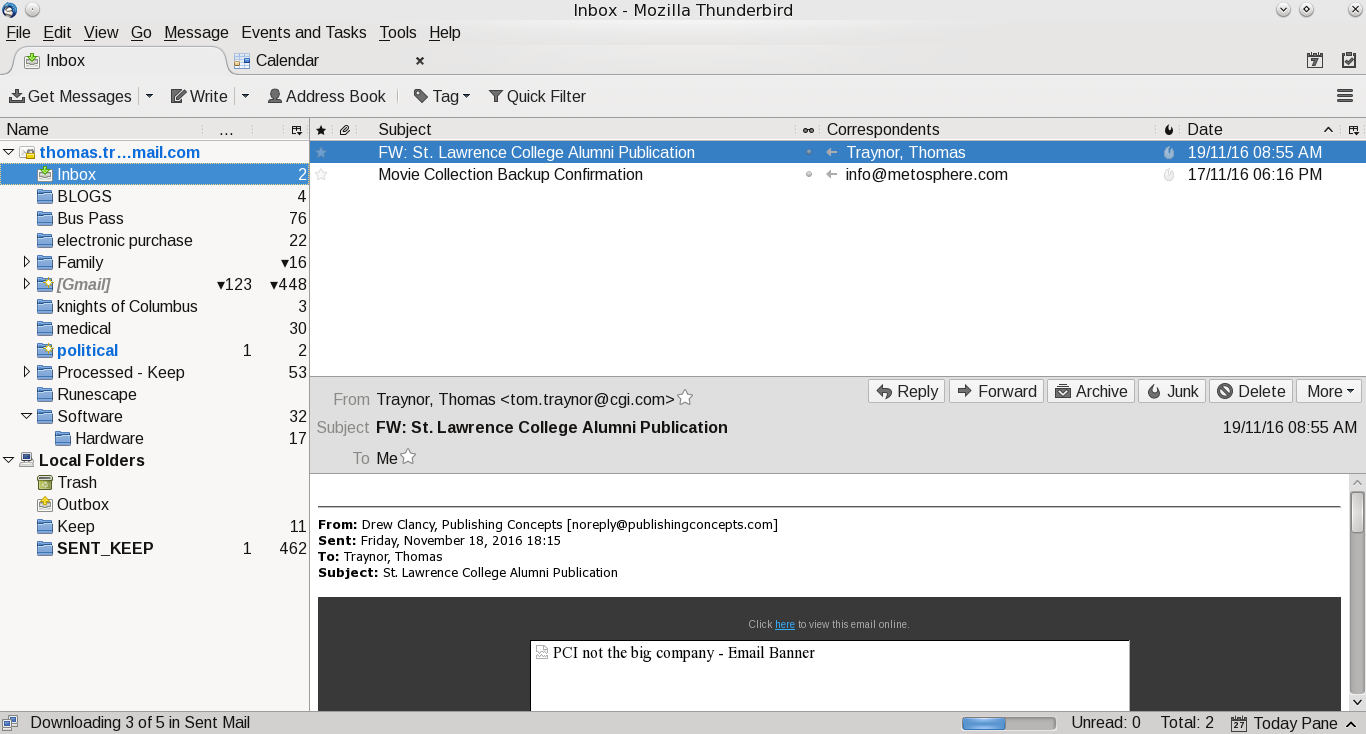
This is the fourth blog on various tools that I use.  Email is a personal preference for what works for you.  Most people I suspect are using Outlook as that is preferred corporate email client and it comes as part of Windows.  My personal preference is actually multiple clients.  My main one is Thunderbird.  It works well in Windows and Linux.  For my Android devices I have two.  GMAIL for Google email (backup client for my Android tablet) and mailbox provided by my ISP.  The last client I use is INBOX from Google.  INBOX is only for my main GMAIL account.  I like this client it as it stays out of my way and allows me to quickly organize and process my mail.

Thunderbird, like Outlook, allows you to create mail rules to categorize (or delete) your email based on rules.  Where I work they use Outlook and I have dozens of rules based on the sender.  The screen prints further in this blog shows the screen, but, at this time my Linux client doesn't have rules as the Windows machine is my main work machine for email (mail from the boss is highest priority and flagged to action immediately, projects go into their own folder).  It doesn't matter what client you use, rules allows you to order your work and focus on what is important.  

In Thunderbird I added an extension to link to my Google Calendar.  I find that handy as I can quickly add/change/delete events when something hits my inbox.  Outlook has that built in and it is a handy option no matter what client you use.

The one thing I never do is open attachments in emails when I don't know the sender.  Even when I know the sender I don't open it up (even in Linux) until I ask if they have sent that file.  My personal preference is to create a folder in my Google Drive, give them access and ask them to upload the file there.  I also have auto-load images in Thunderbird turned off.  Most of the times I don't need to see 'pretty' images and focus just on the text of the message.

The one last client I use is the Google web-mail client.  I like this tool as I can be anywhere and as long as I have access to the internet and a browser I can pick up my mail.

For me I have multiple personal email accounts.
  • My main Google account (linked to this blog);
  • A throwaway account I use for when I am not sure the site will not spam my main Google account.  When it gets too bad I just dump it and create a new throwaway account;
  • A Yahoo account.  This is from many years ago when I didn't have Google mail.  I keep it as it is handy like my throwaway Google account;
  • A Google account for my online gaming.  Some of the sites asks you to register your email account and excluding one game (Runescape) they all use this account;
  • My ISP provides email accounts and I have one set up.  This is for notifications from the ISP and my family usually sends email to this one;

 A few suggestions for your email:

  • If you are using the email from your ISP see if they have spam filters.  If they do, turn them on and use them.  It may not be perfect, but, I find that the one I use is over 99% accurate.  The few times it isn't I flag the email as legitimate and the next time it shows up in my inbox without a problem;
  • If you have an anti-virus and it can integrate with your email client turn it on!  It is another level of defense and I don't see the impact to my client in Windows; 
  • Make use of mail filters.  I use them to categorize my mail and it allows me to focus on what I deem to be important;
  • Guard your email account.  Have a main one for friends and family and only a few others.  For everything else create a throwaway.  If the mail is important you can either forward it to your main email, or, have it as an additional account in your mail client (like Thunderbird does);
Other tools:
  • For those who want to digitally sign your email or encrypt Thunderbird has a support page for this.  At this time I haven't added one; 

Screen Shots of my mail clients

Google Inbox for Android:


My main folder, I like it clean

Google Email for Android:

Main, again clean inbox


Thunderbird:

Mail

Calendar

Extensions

Mail filers

Rules for mail filters